
You’ve got five spec sheets open in five browser tabs. Every vendor claims their smart locker systems are “best in class.” The numbers blur together and you’re not sure which ones actually matter for your building, your people, or your budget.
Here’s the honest answer: to compare smart locker specifications properly, you need to line them up on six things first. Use case. Capacity. Access control. Power and charging. Software. Total cost of ownership. That’s it. Ignore the flashy extras until you’ve nailed those six.
A good rule of thumb? Compare how each locker handles users, devices, and alerts, then worry about colors and branding later.
At honestwaves, we focus on secure device charging lockers, so the examples throughout this article lean toward phones, tablets, and shared IT devices. But the comparison framework works whether you’re evaluating parcel locker systems, asset management lockers, or personal storage for staff.
Get clear on your real use case before touching a spec sheet
Picture two buyers shopping for “smart lockers” in the same month. One is an IT director at a 400 bed hospital who needs to manage loan devices across three shifts. The other runs operations for an event venue in the Middle East that hosts 5,000 person conferences and needs temporary access lockers that survive 45°C heat.
Same product category. Completely different specs.
Before you open a single PDF, write down your top three jobs for the locker system. Some common ones:
- Phone free policies in schools (students surrender devices during the day)
- Staff device lockers in hospitals for shared equipment like tablets and scanners
- Corporate IT asset management for laptop handovers and device exchanges
- Events and temporary deployments where visitors need secure storage for a few hours
The same smart locker system can be configured for parcel workflows, asset control, or personal storage. Smart lockers can be used for parcel delivery, equipment storage, and personal belongings depending on how the software and compartments are set up. Smart lockers automate parcel collection and delivery processes in logistics. Healthcare uses smart lockers for secure medication dispensing. Education institutions deploy them for student device management. Retailers use smart lockers for buy online, pick up in store services (click and collect). Smart lockers also support logistics by enhancing last mile delivery efficiency, and they reduce failed delivery costs by €8 to €12 per attempt.
The smart locker market is projected to reach $7.73 billion by 2026, and smart lockers can improve operational efficiency by 10 to 20% in logistics alone. But none of that matters if you buy specs that don’t match your workflow.
Define “smart locker” vs “electronic locker” so you compare the right things
This distinction trips up more buyers than you’d expect. A smart locker system always includes software, a database, and audit trail capabilities. An electronic locker might just have a PIN pad on each door with no central brain connecting anything.
True smart lockers track who accessed which compartment, when, and for what reason. They often integrate with access control, ITSM, or HR systems. Evaluation of smart lockers must consider physical construction, software capabilities, and operational workflow together.
On spec sheets, look for these markers:
- “Cloud portal” or “admin dashboard”
- “API” or “webhook support”
- “Audit logs” or “access history”
- “User directory integration” (Active Directory, SSO, SAML)
- “Asset management” or “device tracking”
Quick check: if there’s no central dashboard, no reporting tools, and no way to push overdue alerts or detect tampering, it’s probably just electronic locks with a keypad. That might be fine for a gym locker, but it won’t give you the visibility or control you need for shared devices or asset records.
Capacity and modular design: how many compartments do you really need?
This is where people either waste money or run out of space within six months. Most buyers guess capacity from headcount. That’s the wrong number to use. Estimate peak concurrent users for accurate locker capacity instead.
Say you have a 500 person office implementing a phone surrender policy. Do all 500 people need a locker at the same time? Probably not. If only 60 to 80 people are on site at peak hours, you need 60 to 80 bays, not 500. Add a 20% buffer to that peak usage number, and you land around 72 to 96. Plan for 15 to 25% extra compartments beyond peak usage to handle growth or unusual days.
Shared lockers can support 3 to 6 users per compartment daily if dwell times are short (think shift based check in and check out, not assigned lockers for the whole day). That changes the math a lot.
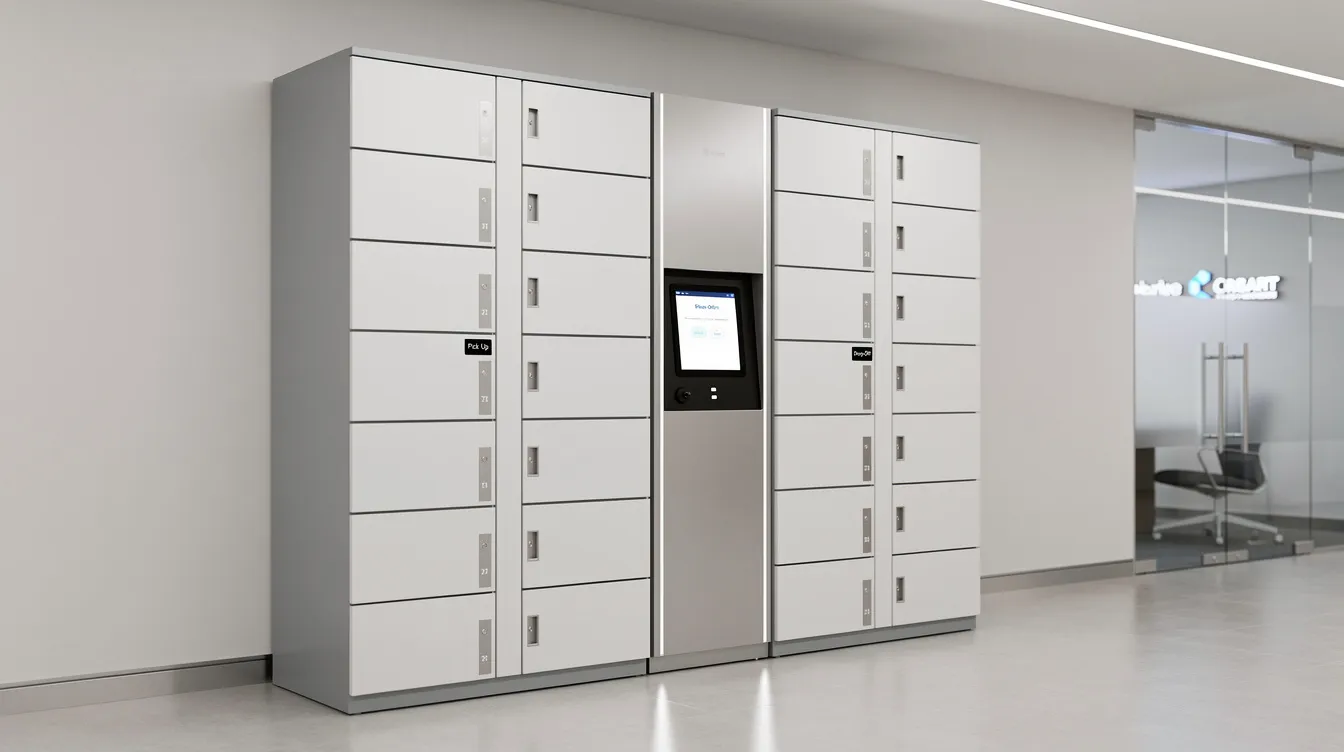
Scalable systems allow for adding additional locker columns as demand increases, so look for modular design in the specs. A main cabinet plus add on modules lets you start smaller and expand capacity as usage grows. At honestwaves, our locker banks can be expanded by connecting more cabinets rather than ripping everything out and starting over.
The real signal that you need more modules? Consistent 75%+ occupancy in your reports and frequent “no free bay” or overdue alerts in the system. Monitor locker usage data to refine capacity estimates over time.
Compartment sizing: match door sizes to what you’re storing
Imagine trying to fit a 15 inch laptop into a phone sized compartment. Or the opposite problem: every single bay is oversized for bags when 80% of your users just need to stash a phone. Compartment dimensions must match the expected item sizes for effective utilization of smart lockers.
Common compartment types include:
- Phone only bays (roughly 4″ x 8″ x 10″ internal)
- Tablet bays (large enough for an iPad Pro with a case)
- Laptop bays (13″ to 16″ device widths, deeper shelves)
- Oversized compartments for bags, scanners, or equipment
Smart lockers should have compartment variety to accommodate different item sizes. Many mixed layouts use roughly half phone bays and half tablet or laptop bays. Temperature controlled lockers (for medications or lab samples) add €3,000 to €7,000 to costs, and refrigerated compartments or ambient compartments are specialty add ons you’ll only need in healthcare or food service.
When reading spec sheets, focus on internal door dimensions, depth, and load rating. Significant weight capacity of compartments must be ensured for secure storage of heavy items like laptops or scanners. Don’t rely on vague “small/medium/large” labels. Ask vendors for real item fit diagrams or sample layouts based on your device list.
For charging systems specifically, check that there’s enough space for cables and cable routing so doors close fully without pinching anything.
Access control and access methods: how people actually open the lockers
A school in California once picked app only lockers for their phone free program. The problem? Half the students couldn’t bring phones into the building to use the app that opened the locker where they were supposed to put their phones. Classic circular problem.
Smart lockers should offer flexibility in access methods to improve user experience and security. The main options include:
- PIN codes (simple, no hardware needed, but codes get shared)
- One time code via email or SMS (great for visitors and temporary access)
- RFID badges (fast, works with existing staff or student IDs)
- QR code scanning (flexible for self service kiosks)
- Biometric access (fingerprint, for high security environments)
Authentication methods for smart lockers include PIN codes, RFID badges, QR codes, and biometrics. Smart lockers use RFID or PIN for secure access in most deployments.
Match the access method to what users already carry. Hospital staff usually have badges. University students have ID cards. Visitors at events have nothing, so a one time code sent by SMS works best. The right choice affects throughput, user adoption, and even how many lockers you need (slower authentication means longer queues means more bays sitting occupied).
Check whether the same smart locker system supports multiple access methods simultaneously, such as badges for staff and one time codes for visitors using the same locker bank.
Security, tamper resistance and smart locker alerts
Steel thickness matters, but it’s only one piece of the security picture. A combination of heavy gauge steel and anti corrosion materials is essential for the durability of lockers. Look for 14 gauge steel or thicker in any spec sheet for high traffic environments.
Beyond the physical build, compare these security specs:
- Access logs and audit trail: who opened what, when, and whether items were returned
- Data encryption: data in transit for smart lockers should use encryption protocols like TLS 1.2 or higher
- Compliance with data privacy regulations is essential for smart locker security features
- Real time monitoring detects tampering and equipment faults
Typical alert types to look for include forced door alerts, repeated failed PIN attempts, doors held open too long, power loss, network loss, and items not collected on time. Automated SMS, email, or push notifications enhance user experience and operational efficiency for smart lockers.
Here’s something people don’t usually talk about: rising overdue alerts often signal capacity or policy issues, not just “bad users.” If 40% of your bays show overdue items every Tuesday, the problem might be your expiry period factor or simply not enough compartments, not irresponsible staff.
Check whether alerts are configurable (thresholds, escalation rules, channels) and whether they integrate with existing ticketing or incident tools. Smart lockers must provide real time notifications for user actions like uploads and overdue items. If alerts just flash on a dashboard nobody watches, they’re useless.
Charging capabilities: powered vs non powered smart lockers
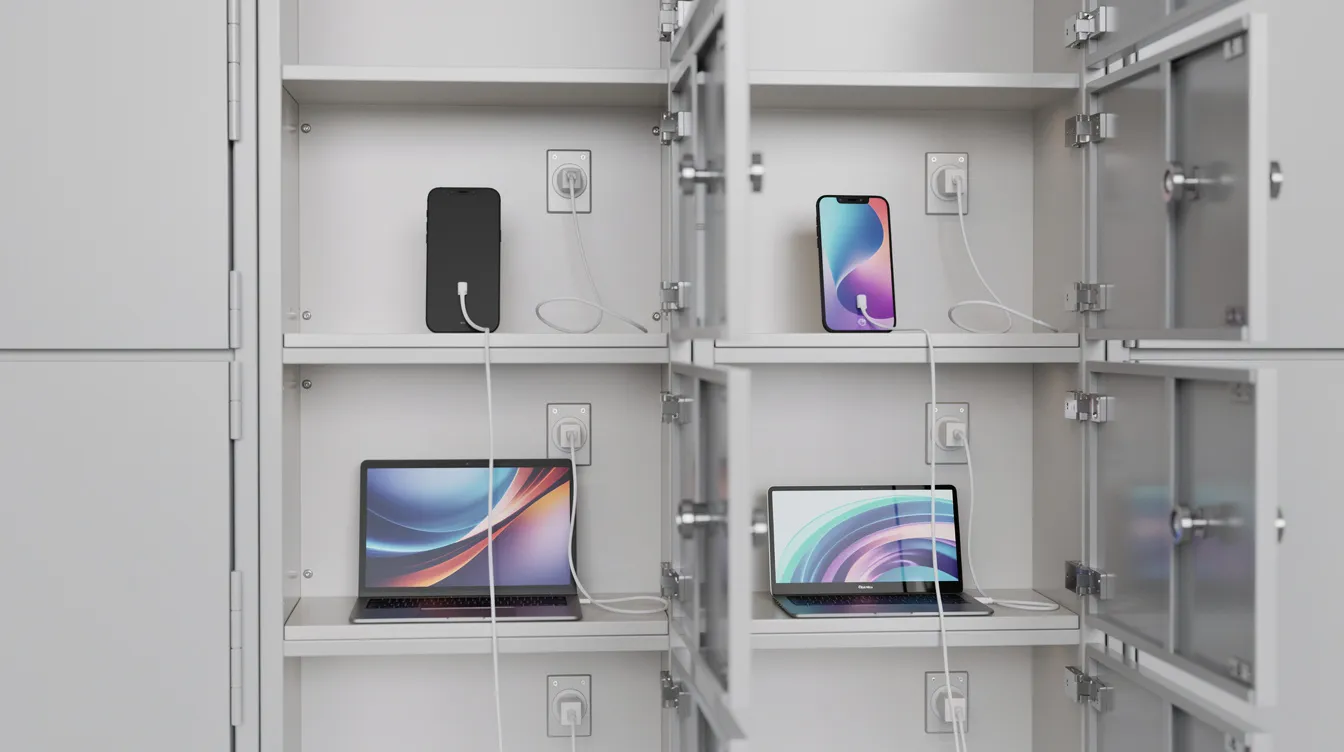
For device heavy environments like hospitals, universities, and events, charging is often more critical than people expect. Smart lockers can charge devices while securely storing them, which means staff or students pick up a fully charged phone or tablet instead of a dead one.
Key charging specs to compare:
- Port types per compartment (USB A, USB C PD, mains outlet)
- Maximum power output per bay (e.g., 36W USB C PD vs 5W USB A)
- Data blocking support (prevents “juice jacking” where USB connections steal data)
- Thermal management and ventilation for heat buildup in powered compartments
At honestwaves, our phone charging lockers ship with data blocking as standard protection. This matters because if users plug in personal phones, you don’t want the locker’s USB connection to become a data vulnerability.
Powered compartments usually mean fewer doors per cabinet (more space for wiring and ventilation) and more heat, which affects layout and installation requirements.
Quick example: a non charging day locker for short term phone surrender at a school entrance needs minimal power. A charging locker at a hospital for device management that lets nursing staff start every shift with full devices ready to go needs USB C PD in every bay and proper airflow. Same product category, very different specs.
Software platform: the part of the smart locker spec that is easy to skip
Lots of buyers obsess over door counts and ignore the software line item. Then a year later, they’re stuck exporting CSVs by hand and calling their vendor about a firmware bug that’s been open for months.
The software in smart lockers determines administrative workload and operational efficiency. Cloud based management platforms often provide easier scalability for smart lockers. Cloud dashboards provide insights into locker usage and performance.
Core software questions to compare across locker systems:
- Where is it hosted? (Cloud, on premise, hybrid)
- How do admins manage users and user groups?
- What reporting tools are available? (Usage, occupancy, alert history)
- How are firmware updates delivered? (Over the air, manual USB, remote push)
- Does the platform support rules like time limits, auto reminders, and forced return workflows?
Ask for screenshots of the admin dashboard, not just marketing slides. That tells you more about day to day usability than any feature list. Automated systems enhance distribution efficiency and user convenience when the software actually works well.
At honestwaves, our dashboards let facility managers check locker usage, door health, and alert history at a glance without digging through menus or waiting for reports.
Integrations: SSO, directories, and asset management tools
Ask yourself: what systems already know who your people are and what devices they own? That’s where integration starts.
Typical integrations to compare on spec sheets:
- Microsoft Entra ID (formerly Azure AD) or on premise Active Directory
- Okta, SAML, or other SSO providers
- HR systems and student information systems
- ITSM tools like ServiceNow, Jira Service Management, or TopDesk
- Asset management platforms
HR integration via Identity Providers can streamline user provisioning for smart lockers. Smart locker systems should integrate with existing access control and facility management software.
There’s a real difference between basic CSV imports, simple API hooks, and deep native integrations. Integration complexity is a major challenge for smart locker deployment, and it affects setup time and long term maintenance. A vendor with a documented, stable API saves you weeks compared to one where every connection is a custom project.
Check whether vendors charge separately for each integration or include it in the base license. Some “affordable” systems become expensive once you add SSO and ITSM connectors at $500 to $2,000 each.
Location, footprint and traffic flow around the locker system
Picture a busy hospital corridor at 8 a.m. Thirty nurses trying to grab devices from a single locker bank that’s blocking the path to the ward. Beds and trolleys can’t get through. The locker specs looked great on paper, but nobody checked the floor space requirements.
Compare physical specs beyond just width:
- Cabinet height, depth, and required rear clearances
- Door swing area (a fully open door might extend 18 to 24 inches into the hallway)
- Weight (affects shipping, floor load, and whether you need reinforcement)
- Nearest power outlet and network connection
Mark locker locations on actual floor plans. Check proximity to power, network drops, and fire exits before picking a model size. Sometimes splitting into two smaller locker banks on opposing walls works better than one huge wall of lockers.
For outdoor or semi outdoor deployments, compare IP ratings, UV resistance, and operating temperature ranges. Outdoor smart lockers require IP ratings to ensure protection from dust and moisture. This is especially important in climates like the Middle East where ambient temperatures regularly exceed 40°C.
Smart locker alerts, logs and analytics: using data to refine specs over time
Built in analytics in smart locker software can provide insights into usage patterns and optimize capacity management. This isn’t a nice bonus. It should be a core part of any spec comparison.
The metrics that matter most:
- Occupancy rate (average and peak, by time of day and day of week)
- Average dwell time (how long devices stay in compartments)
- Peak usage windows (when do you hit capacity?)
- Overdue alerts patterns (which user groups have the most overdue items?)
- Device exchange frequency (how many check ins and check outs per day?)
Smart locker alerts for overdue devices, tampering, and maintenance feed directly into these reports and help teams know when to adjust policies or add modules.
Quick example: a university notices Tuesday and Thursday peaks because those are the days with the most in person labs. They tweak booking windows for those days and add one expansion module near the library. Problem solved without buying a whole new system.
Check whether you can export data to CSV or BI tools, filter by one site or locker bank, and schedule regular reports for different user groups.
Total cost of ownership: looking beyond the sticker price
Here’s where many buying decisions go sideways. A cheaper locker with weak software might save $3,000 upfront, but cost you dozens of IT staff hours per month and lead to device loss that dwarfs the sticker price difference.
Smart locker hardware costs between $2,500 and $21,000 per unit depending on bay count, materials, and features. But hardware is just the start. The total cost of ownership for smart lockers includes installation, site prep costs, and ongoing maintenance.
All major cost components to compare side by side:
| Cost Component | Typical Range | Notes |
|---|---|---|
| Hardware (per unit) | $2,500 to $21,000 | Depends on bay count, materials, charging |
| Installation | €800 to €1,500 | Power, network cabling, mounting |
| Software subscription | Varies (per unit or per user) | Growing part of smart locker pricing |
| Annual operating costs | €750 to €1,300 | Energy, cleaning, minor repairs |
| Maintenance and warranty | Varies | Some vendors charge for firmware updates |
High installation costs can be a barrier for smaller organizations. Ongoing software subscription costs can impact TCO over years. Energy consumption of smart lockers should be factored into the TCO over time, especially for powered compartments running all day.
Cost gotchas that hide in fine print: paid software upgrades, mandatory “pro” tiers for basic features like overdue alerts, per user pricing that explodes with scale, and travel costs for on site repairs.
At honestwaves, we offer lifetime warranty on core hardware, which can shift the smart locker system cost calculation meaningfully over a 5 year span.
Calculate cost per active user or per device per month over five years, not just the upfront invoice. That gives you a real smart locker ROI picture.
Reliability, maintenance and service expectations
From a facilities or IT perspective, reliability looks like this: doors latch properly every time, RFID readers respond in under a second, screens don’t go blank mid shift, and the system doesn’t drop offline when your Wi Fi hiccups.
Durability of smart locker electronic locks should be rated for high cycles to avoid maintenance issues. Ask vendors for reference sites with 3+ years of production use on the same model.
What to compare:
- Lock rated duty cycles (e.g., 100,000+ open/close cycles)
- Battery life for battery powered smart locks (some claim 5 to 10 years)
- Remote diagnostics and firmware update capabilities
- Maintenance costs over time (replacement parts, service calls, travel fees)
- Support response times (SLA guarantees vs vague promises)
Smart locker alerts tied to maintenance (door failures, low power issues, connectivity drops) cut downtime if they reach the right team quickly. Check whether remote diagnostics and over the air firmware updates are included or chargeable extras.
Regional and environmental considerations, including the Middle East
Specs should be read with your location in mind. Climate, regulations, and typical building infrastructure vary, and a locker rated for a climate controlled office in London might fail in a semi outdoor lobby in Dubai.
For the Middle East specifically:
- Operating temperature ranges need to handle 45°C+ ambient conditions
- IP54 or IP65 ratings for dust and moisture if deployed near entrances
- UV stable coatings and anti corrosion finishes for sun exposed installations
- Power input compatibility (110 to 220V adjustable)
Check local fire and safety standards for battery charging lockers. Ask whether the same model has live references in your region, especially in high heat or high humidity environments.
In some regions, mobile coverage or Wi Fi reliability will affect whether cloud connected or more offline tolerant locker systems are the better choice. If your venue loses internet for hours at a time, an entirely cloud dependent system becomes a very expensive paperweight.
How to build a simple comparison matrix that your team can actually use
Here’s what works: a basic table with columns for each vendor and rows for the 10 to 15 spec points that actually affect user experience and operations.
Keep it to these categories:
- Number of compartments and modular expansion
- Compartment sizes and door opening dimensions
- Access methods supported
- Charging type and wattage per bay
- Data blocking capability
- Alert types and configurability
- Software hosting and admin features
- Integration options (SSO, API, ITSM)
- Physical footprint and weight
- Environmental ratings
- Warranty and support tiers
- Total cost (hardware + software + installation + 5 year operating)
Avoid 100 row spreadsheets at first. Fill in raw facts from each smart locker specification sheet and manual, then color code or score after.
Keep a separate notes column for “unknowns” that need clarification with sales engineers. Things like how alerts are configured, whether SSO is fully supported, or whether the average daily parcel volume rating applies to your workflow.
Where honestwaves fits: phone charging lockers and device smart lockers
We specialize in secure phone charging stations, device smart locker systems, portable charging kiosks, and charging tables for B2B environments. Hospitals, universities, corporate offices, government facilities, and event venues are where our products live every day.
If you’re looking for a specific locker format, the SmartLocker 40 is a good example of a high capacity charging locker with PIN and RFID access, data blocking cables, and cloud based management. For environments that need UV C disinfection (still relevant in healthcare), the SecureTech 16 combines secure storage with device sanitization.
All the examples in this article map to features you can see on those product pages: access control options, modular design, charging outputs, overdue alerts, and usage analytics. If you manage a hospital, university, office, or venue, these models show how smart locker specifications translate into real world installations.
Real world example: before vs after choosing the right smart locker system
A regional hospital was managing 120 shared iPads across three nursing shifts using a locked cupboard and a paper sign out sheet. The “system” was a spreadsheet taped to the cupboard door.
Before the smart locker deployment:
- 3 to 5 devices went missing per month (nobody could trace who had them last)
- Nurses started shifts with dead tablets because nobody charged them overnight
- IT staff spent roughly 8 hours a week on manual handovers and hunting missing devices
- No asset record existed beyond the honor system
After switching to a cloud connected smart locker system with RFID badge access and per bay charging:
- Users tap their badge, grab a charged device, and go. The whole interaction takes under 10 seconds.
- Overdue alerts flag unreturned devices after shift end, so the charge nurse can follow up immediately
- Zero unreported device losses over the first 60 days
- IT recovered those 8 weekly hours and redirected them to actual support work
- Admins see usage analytics by shift, floor, and day of week, and used that data to move two locker compartments from a low traffic wing to the ER entrance
The business case wrote itself after the first quarter.
FAQs
What’s the first spec I should look at when comparing smart lockers?
Start with your use case and access method. Once you know what you’re storing and how people will open the doors, every other spec falls into place. Are smart lockers worth the analysis time? Yes, if you get these two things right first.
How do smart locker alerts actually help day to day?
They show you overdue devices, tampering attempts, and maintenance issues before they become real problems. Instead of discovering a broken door at 7 a.m. during rush, you get a notification the night before and fix it.
Do I really need charging inside the lockers?
If users leave phones or laptops for hours (a full school day, an 8 hour shift), charging is a big win. For 10 minute drop offs at an event, it’s probably optional and you’d save money skipping powered compartments.
Are smart lockers worth it for a small team?
It depends on transaction volume and device value. If you’re managing $800 tablets for 15 people across shifts, even a single bank of a specific locker like the SmartLocker 8 pays for itself after preventing a couple of losses. Some small sites start with one modest locker bank then expand capacity if usage grows.
Can one smart locker bank handle staff and visitors together?
Many systems support this through different access methods or software rules. Staff use badges, visitors get a one time code. But if traffic is heavy, sometimes separating flows into distinct locker banks keeps things simpler and faster for everyone. People expect self service to be quick, and mixing user groups can slow that down.
How to move from comparing specs to making a confident choice?
Don’t chase the most impressive spec sheet. Chase the right smart locker system that matches your workflow, your users, and where you’ll be in two years. The smart locker investment that looks “good enough” on paper but fits your actual operations will outperform the flashiest system that solves problems you don’t have.
If you focus on use case, capacity, access method, charging, software, integrations, and smart locker alerts, you’re already ahead of most buyers in the smart locker market.
Browse the honestwaves smart locker range to see how these specs look in real products. Check out the SecureTech EDU Series for schools or the 32 Bay Scanner and Tablet Charging Locker for warehouses and hospitals. Grab a few product images to share with your team.
When you’re ready, request a quote with your rough capacity needs, site layout, and preferred access method. That way the conversation starts from real requirements, not guesswork. Choosing the right smart locker solution gets a lot easier once you know which specs actually matter.